 2. 模型 I/O 封装
把不同的模型,统一封装成一个接口,方便更换模型而不用重构代码。
# 2.1 模型 API
OpenAI 模型封装
pip install --upgrade langchain
pip install --upgrade langchain-openai
pip install --upgrade langchain-community
1
2
3
2
3
from langchain_openai import ChatOpenAI

llm = ChatOpenAI(model="gpt-4o-mini")  # 默认是gpt-3.5-turbo
response = llm.invoke("你好")
print(response.content)
# out: 你好!有什么我可以帮助你的吗?
1
2
3
4
5
6
2
3
4
5
6
# 2.2 多轮对话 session 封装
from langchain_openai import ChatOpenAI
from langchain.schema import (
    AIMessage,  # 等价于OpenAI接口中的assistant role
    HumanMessage,  # 等价于OpenAI接口中的user role
    SystemMessage  # 等价于OpenAI接口中的system role
)

llm = ChatOpenAI(model="gpt-4o-mini")  # 默认是gpt-3.5-turbo

messages = [
    SystemMessage(content="你是AGI应用开发导师。"),
    HumanMessage(content="我是学生,我叫xsl。"),
    AIMessage(content="欢迎!"),
    HumanMessage(content="我是谁")
]

ret = llm.invoke(messages)

print(ret.content)

# out: 你是学生,名字叫xsl。有任何关于学习或其他方面的问题可以问我,我很乐意帮助你!
1
2
3
4
5
6
7
8
9
10
11
12
13
14
15
16
17
18
19
20
21
2
3
4
5
6
7
8
9
10
11
12
13
14
15
16
17
18
19
20
21
# 2.3 其他模型(百度千帆大模型)
(1)安装依赖
pip install python-dotenv
pip install qianfan
1
2
2
(2).env 文件配置 API_KEY 与 SECRET_KEY
API_KEY=your_api_key
SECRET_KEY=your_secret_key
1
2
2
(3)代码示例
# 其它模型分装在 langchain_community 底包中
import dotenv
import os
from langchain_community.chat_models import QianfanChatEndpoint
from langchain_core.messages import HumanMessage

dotenv.load_dotenv()
api_key = os.getenv('API_KEY')
secret_key = os.getenv('SECRET_KEY')
llm = QianfanChatEndpoint(
    api_key=api_key,
    secret_key=secret_key
)

messages = [
    HumanMessage(content="介绍一下你自己")
]

ret = llm.invoke(messages)

print(ret.content)

# out: 您好,我是文心一言,英文名是ERNIE Bot。我能够与人对话互动,回答问题,协助创作,高效便捷地帮助人们获取信息、知识和灵感。
1
2
3
4
5
6
7
8
9
10
11
12
13
14
15
16
17
18
19
20
21
22
23
2
3
4
5
6
7
8
9
10
11
12
13
14
15
16
17
18
19
20
21
22
23
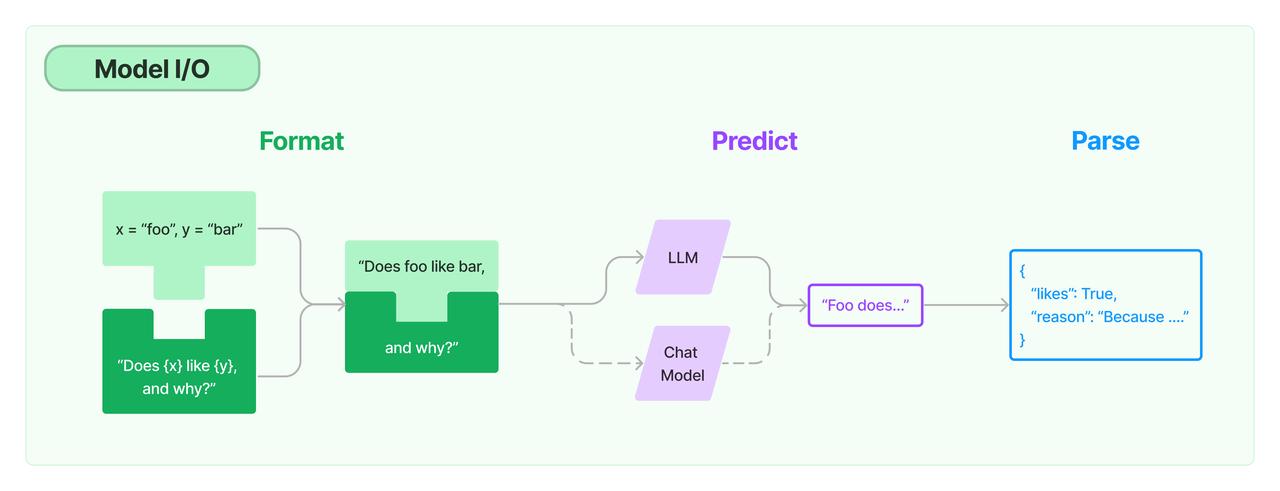
# 2.4 模型输入与输出
下图说明了一个模型输入到输出的完整流程:
# 2.5 Prompt 模板封装
PromptTemplate
PromptTemplate 为最简单的单个 Prompt 模板:
from langchain.prompts import PromptTemplate
from langchain_openai import ChatOpenAI

template = PromptTemplate.from_template("给我讲个关于{subject}的笑话")

llm = ChatOpenAI()
# 通过 Prompt 调用 LLM
ret = llm.invoke(template.format(subject='小明'))
# 打印输出
print(ret.content)

# out: 小明去参加拔河比赛,结果他站在后面一点,大声地喊:"大家放心,我不过是来凑热闹的!" 最后比赛结束后,小明居然站在最前面,其他人都惊讶地问他怎么做到的。小明一脸淡定地回答:"哦,我只是趁大家没在意的时候,悄悄地将绳子掰断了而已。" 惹得大家哈哈大笑。
1
2
3
4
5
6
7
8
9
10
11
12
2
3
4
5
6
7
8
9
10
11
12
ChatPromptTemplate
ChatPromptTemplate 用于表示对话上下文的模板化方式:
from langchain.prompts import (
    ChatPromptTemplate,
    HumanMessagePromptTemplate,
    SystemMessagePromptTemplate,
)
from langchain_openai import ChatOpenAI

template = ChatPromptTemplate.from_messages(
    [
        SystemMessagePromptTemplate.from_template(
            "你是{product}的导师。你的名字叫{name}"),
        HumanMessagePromptTemplate.from_template("{query}"),
    ]
)

llm = ChatOpenAI()
prompt = template.format_messages(
    product="AGI应用开发",
    name="吴恩达",
    query="你是谁"
)

print(prompt)

ret = llm.invoke(prompt)

print(ret.content)

# out:
# [SystemMessage(content='你是AGI应用开发的导师。你的名字叫吴恩达', additional_kwargs={}, response_metadata={}), HumanMessage(content='你是谁', additional_kwargs={}, response_metadata={})]
# 你好,我是AGI应用开发的导师,名字叫吴恩达。有什么问题可以请教我的吗?
1
2
3
4
5
6
7
8
9
10
11
12
13
14
15
16
17
18
19
20
21
22
23
24
25
26
27
28
29
30
31
2
3
4
5
6
7
8
9
10
11
12
13
14
15
16
17
18
19
20
21
22
23
24
25
26
27
28
29
30
31
MessagesPlaceholder
MessagesPlaceholder 用于将多轮对话变成模板:
from langchain.prompts import (
    ChatPromptTemplate,
    HumanMessagePromptTemplate,
    MessagesPlaceholder,
)
from langchain_core.messages import AIMessage, HumanMessage
from langchain_openai import ChatOpenAI

human_prompt = "Translate your answer to {language}."
human_message_template = HumanMessagePromptTemplate.from_template(human_prompt)

chat_prompt = ChatPromptTemplate.from_messages(
    # variable_name 是 message placeholder 在模板中的变量名
    # 用于在赋值时使用
    [MessagesPlaceholder("history"), human_message_template]
)


human_message = HumanMessage(content="Who is Elon Musk?")
ai_message = AIMessage(
    content="Elon Musk is a billionaire entrepreneur, inventor, and industrial designer"
)

messages = chat_prompt.format_prompt(
    # 对 "history" 和 "language" 赋值
    history=[human_message, ai_message], language="中文"
)
llm = ChatOpenAI(model="gpt-4o-mini")
result = llm.invoke(messages)
print(result.content)

# out: 埃隆·马斯克是一位亿万富翁企业家、发明家和工业设计师。
1
2
3
4
5
6
7
8
9
10
11
12
13
14
15
16
17
18
19
20
21
22
23
24
25
26
27
28
29
30
31
32
2
3
4
5
6
7
8
9
10
11
12
13
14
15
16
17
18
19
20
21
22
23
24
25
26
27
28
29
30
31
32
从文件加载模板
准备一个 prompt 模板文件:example_prompt_template.txt
举一个关于{topic}的例子
1
from langchain.prompts import PromptTemplate

template = PromptTemplate.from_file("example_prompt_template.txt", encoding="utf-8")
print(template.format(topic='黑色幽默'))
# out: 举一个关于黑色幽默的例子
1
2
3
4
5
2
3
4
5
# 2.6 结构化输出
输出 Pydantic 对象
import json

from langchain_openai import ChatOpenAI

from pydantic import BaseModel, Field
from langchain.prompts import PromptTemplate, ChatPromptTemplate, HumanMessagePromptTemplate

# 定义你的输出对象
class Date(BaseModel):
    year: int = Field(description="Year")
    month: int = Field(description="Month")
    day: int = Field(description="Day")
    era: str = Field(description="BC or AD")

    def __str__(self):
        return json.dumps(self.model_dump())

model_name = 'gpt-4o-mini'
temperature = 0
llm = ChatOpenAI(model=model_name, temperature=temperature)

# 定义结构化输出的模型
structured_llm = llm.with_structured_output(Date)

template = """提取用户输入中的日期。
用户输入:
{query}"""

prompt = PromptTemplate(
    template=template,
)

query = "2023年四月6日天气晴..."
input_prompt = prompt.format_prompt(query=query)

print(structured_llm.invoke(input_prompt))

# out: {"year": 2023, "month": 4, "day": 6, "era": "AD"}
1
2
3
4
5
6
7
8
9
10
11
12
13
14
15
16
17
18
19
20
21
22
23
24
25
26
27
28
29
30
31
32
33
34
35
36
37
38
2
3
4
5
6
7
8
9
10
11
12
13
14
15
16
17
18
19
20
21
22
23
24
25
26
27
28
29
30
31
32
33
34
35
36
37
38
输出指定格式的 JSON
from langchain_openai import ChatOpenAI
from langchain.prompts import PromptTemplate

json_schema = {
    "title": "Date",
    "description": "Formated date expression",
    "type": "object",
    "properties": {
        "year": {
            "type": "integer",
            "description": "year, YYYY",
        },
        "month": {
            "type": "integer",
            "description": "month, MM",
        },
        "day": {
            "type": "integer",
            "description": "day, DD",
        },
        "era": {
            "type": "string",
            "description": "BC or AD",
        },
    },
}

model_name = 'gpt-4o-mini'
temperature = 0
llm = ChatOpenAI(model=model_name, temperature=temperature)

# 定义结构化输出的模型
structured_llm = llm.with_structured_output(json_schema)

template = """提取用户输入中的日期。
用户输入:
{query}"""

prompt = PromptTemplate(
    template=template,
)

query = "2023年四月6日天气晴..."
input_prompt = prompt.format_prompt(query=query)

print(structured_llm.invoke(input_prompt))

# out: {'year': 2023, 'month': 4, 'day': 6, 'era': 'AD'}
1
2
3
4
5
6
7
8
9
10
11
12
13
14
15
16
17
18
19
20
21
22
23
24
25
26
27
28
29
30
31
32
33
34
35
36
37
38
39
40
41
42
43
44
45
46
47
48
2
3
4
5
6
7
8
9
10
11
12
13
14
15
16
17
18
19
20
21
22
23
24
25
26
27
28
29
30
31
32
33
34
35
36
37
38
39
40
41
42
43
44
45
46
47
48
# 2.7 OutputParser
JsonOutputParser
import json

from langchain_openai import ChatOpenAI

from pydantic import BaseModel, Field
from langchain.prompts import PromptTemplate
from langchain_core.output_parsers import JsonOutputParser

# 定义你的输出对象
class Date(BaseModel):
    year: int = Field(description="Year")
    month: int = Field(description="Month")
    day: int = Field(description="Day")
    era: str = Field(description="BC or AD")

    def __str__(self):
        return json.dumps(self.model_dump())


parser = JsonOutputParser(pydantic_object=Date)

prompt = PromptTemplate(
    template="提取用户输入中的日期。\n用户输入:{query}\n{format_instructions}",
    input_variables=["query"],
    partial_variables={"format_instructions": parser.get_format_instructions()},
)
query = "2023年四月6日天气晴..."
input_prompt = prompt.format_prompt(query=query)


model_name = 'gpt-4o-mini'
temperature = 0
llm = ChatOpenAI(model=model_name, temperature=temperature)
output = llm.invoke(input_prompt)
print("原始输出:\n"+output.content)

print(f"\n解析后:{parser.invoke(output)}")

"""
out:
原始输出:
```json
{"year": 2023, "month": 4, "day": 6, "era": "AD"}
1
2
3
4
5
6
7
8
9
10
11
12
13
14
15
16
17
18
19
20
21
22
23
24
25
26
27
28
29
30
31
32
33
34
35
36
37
38
39
40
41
42
43
2
3
4
5
6
7
8
9
10
11
12
13
14
15
16
17
18
19
20
21
22
23
24
25
26
27
28
29
30
31
32
33
34
35
36
37
38
39
40
41
42
43
解析后:{'year': 2023, 'month': 4, 'day': 6, 'era': 'AD'} """
**PydanticOutputParser**

```python
import json

from langchain_openai import ChatOpenAI

from pydantic import BaseModel, Field
from langchain.prompts import PromptTemplate
from langchain_core.output_parsers import PydanticOutputParser

# 定义你的输出对象
class Date(BaseModel):
    year: int = Field(description="Year")
    month: int = Field(description="Month")
    day: int = Field(description="Day")
    era: str = Field(description="BC or AD")

    def __str__(self):
        return json.dumps(self.model_dump())


parser = PydanticOutputParser(pydantic_object=Date)

prompt = PromptTemplate(
    template="提取用户输入中的日期。\n用户输入:{query}\n{format_instructions}",
    input_variables=["query"],
    partial_variables={"format_instructions": parser.get_format_instructions()},
)
query = "2023年四月6日天气晴..."
input_prompt = prompt.format_prompt(query=query)


model_name = 'gpt-4o-mini'
temperature = 0
llm = ChatOpenAI(model=model_name, temperature=temperature)
output = llm.invoke(input_prompt)
print("原始输出:\n"+output.content)

print(f"\n解析后:{parser.invoke(output)}")

"""
out:
原始输出:
```json
{"year": 2023, "month": 4, "day": 6, "era": "AD"}
1
2
3
4
5
6
7
8
9
10
11
12
13
14
15
16
17
18
19
20
21
22
23
24
25
26
27
28
29
30
31
32
33
34
35
36
37
38
39
40
41
42
43
44
45
46
47
2
3
4
5
6
7
8
9
10
11
12
13
14
15
16
17
18
19
20
21
22
23
24
25
26
27
28
29
30
31
32
33
34
35
36
37
38
39
40
41
42
43
44
45
46
47
解析后:{"year": 2023, "month": 4, "day": 6, "era": "AD"} """
**OutputFixingParser**

利用大模型做格式自动纠错:

```python
import json

from langchain_openai import ChatOpenAI

from pydantic import BaseModel, Field
from langchain.prompts import PromptTemplate
from langchain_core.output_parsers import PydanticOutputParser
from langchain.output_parsers import OutputFixingParser

# 定义你的输出对象
class Date(BaseModel):
    year: int = Field(description="Year")
    month: int = Field(description="Month")
    day: int = Field(description="Day")
    era: str = Field(description="BC or AD")

    def __str__(self):
        return json.dumps(self.model_dump())


parser = PydanticOutputParser(pydantic_object=Date)

prompt = PromptTemplate(
    template="提取用户输入中的日期。\n用户输入:{query}\n{format_instructions}",
    input_variables=["query"],
    partial_variables={"format_instructions": parser.get_format_instructions()},
)
query = "2023年四月6日天气晴..."
input_prompt = prompt.format_prompt(query=query)


model_name = 'gpt-4o-mini'
temperature = 0
llm = ChatOpenAI(model=model_name, temperature=temperature)
output = llm.invoke(input_prompt)

# 假设输出的是一个错误的json
bad_output = output.content.replace("4", '四')
print("错误串:", bad_output)

print("PydanticOutputParser:")
try:
    parser.invoke(bad_output)
except Exception as e:
    print(e)

print("OutputFixingParser:")
new_parser = OutputFixingParser.from_llm(parser=parser, llm=ChatOpenAI())
# 正确则什么也不做,错误则修复
print(new_parser.invoke(bad_output))

"""
out:
错误串: ```json
{"year": 2023, "month": 四, "day": 6, "era": "AD"}
1
2
3
4
5
6
7
8
9
10
11
12
13
14
15
16
17
18
19
20
21
22
23
24
25
26
27
28
29
30
31
32
33
34
35
36
37
38
39
40
41
42
43
44
45
46
47
48
49
50
51
52
53
54
55
56
57
58
59
60
61
2
3
4
5
6
7
8
9
10
11
12
13
14
15
16
17
18
19
20
21
22
23
24
25
26
27
28
29
30
31
32
33
34
35
36
37
38
39
40
41
42
43
44
45
46
47
48
49
50
51
52
53
54
55
56
57
58
59
60
61
PydanticOutputParser: Invalid json output: ```json {"year": 2023, "month": 四, "day": 6, "era": "AD"}
For troubleshooting, visit: https://python.langchain.com/docs/troubleshooting/errors/OUTPUT_PARSING_FAILURE
OutputFixingParser:
{"year": 2023, "month": 4, "day": 6, "era": "AD"}
"""
1
2
3
4
2
3
4
# 2.8 Function Calling
import json
from langchain_core.messages import HumanMessage
from langchain_openai import ChatOpenAI
from langchain_core.tools import tool

@tool
def add(a: int, b: int) -> int:
    """Add two integers.

    Args:
        a: First integer
        b: Second integer
    """
    return a + b

@tool
def multiply(a: int, b: int) -> int:
    """Multiply two integers.

    Args:
        a: First integer
        b: Second integer
    """
    return a * b

available_tools = {"add": add, "multiply": multiply}


model_name = 'gpt-4o-mini'
temperature = 0
llm = ChatOpenAI(model=model_name, temperature=temperature)

llm_with_tools = llm.bind_tools([add, multiply])

query = "3的(4加2)倍是多少?"
messages = [HumanMessage(query)]

output = llm_with_tools.invoke(messages)


while output.tool_calls:
    messages.append(output)
    for tool_call in output.tool_calls:
        tool_name = tool_call["name"].lower()
        function = available_tools[tool_name]

        # 调用工具并获取结果
        tool_msg = function.invoke(tool_call)

        # 输出工具调用结果
        print(f"调用{tool_name}函数,参数为{tool_call['args']},返回值为{tool_msg}")
        messages.append(tool_msg)

    # 继续调用模型,传递工具消息
    output = llm_with_tools.invoke(messages)

print(output.content)

"""
out:
调用add函数,参数为{'a': 4, 'b': 2},返回值为content='6' name='add' tool_call_id='call_XkB98A0t2aKOYls0C5jCpj9I'
调用multiply函数,参数为{'a': 3, 'b': 6},返回值为content='18' name='multiply' tool_call_id='call_DxqOOlYez7YhASSfzGEeVUPo'
3的(4加2)倍是18。
"""
1
2
3
4
5
6
7
8
9
10
11
12
13
14
15
16
17
18
19
20
21
22
23
24
25
26
27
28
29
30
31
32
33
34
35
36
37
38
39
40
41
42
43
44
45
46
47
48
49
50
51
52
53
54
55
56
57
58
59
60
61
62
63
64
2
3
4
5
6
7
8
9
10
11
12
13
14
15
16
17
18
19
20
21
22
23
24
25
26
27
28
29
30
31
32
33
34
35
36
37
38
39
40
41
42
43
44
45
46
47
48
49
50
51
52
53
54
55
56
57
58
59
60
61
62
63
64
编辑 (opens new window)
上次更新: 2025/12/19, 15:17:48
